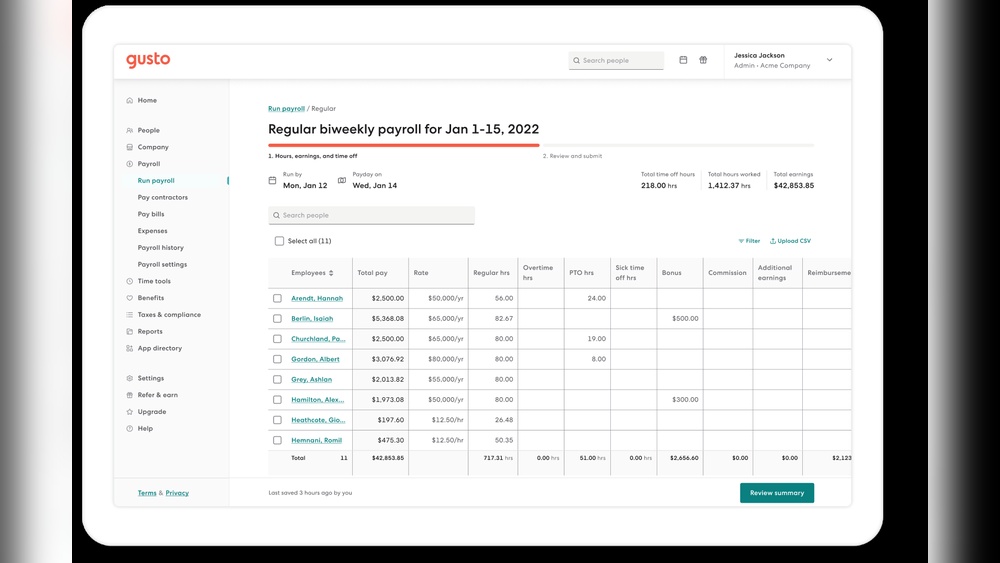

Managing your payroll can feel overwhelming and time-consuming. What if there was a way to make it simple, fast, and error-free?
That’s where Gusto Payroll Processing comes in. Imagine having a tool that handles your employee payments, tax filings, and benefits all in one place—saving you hours every week. You’ll discover how Gusto can transform your payroll tasks from a headache into a smooth, stress-free experience.
Keep reading to find out why so many businesses trust Gusto to keep their payroll running perfectly.
Why Choose Gusto For Payroll
Choosing the right payroll system can save time and reduce stress. Gusto offers a simple way to manage payroll for any small business. It handles taxes, payments, and compliance all in one place. Many business owners trust Gusto for its reliability and ease.
Key Features Of Gusto Payroll
Gusto processes payroll automatically every pay period. It calculates taxes and files them with the government. Employees get paid by direct deposit or check. The platform also offers benefits management and time tracking. Reports and summaries help keep finances clear and organized.
Benefits For Small Businesses
Small businesses save hours on payroll tasks. Gusto reduces errors and late payments. It keeps businesses compliant with tax laws. The service supports multiple payment schedules. Employee benefits like health insurance can be managed easily. This helps small teams focus on growth.
User-friendly Interface
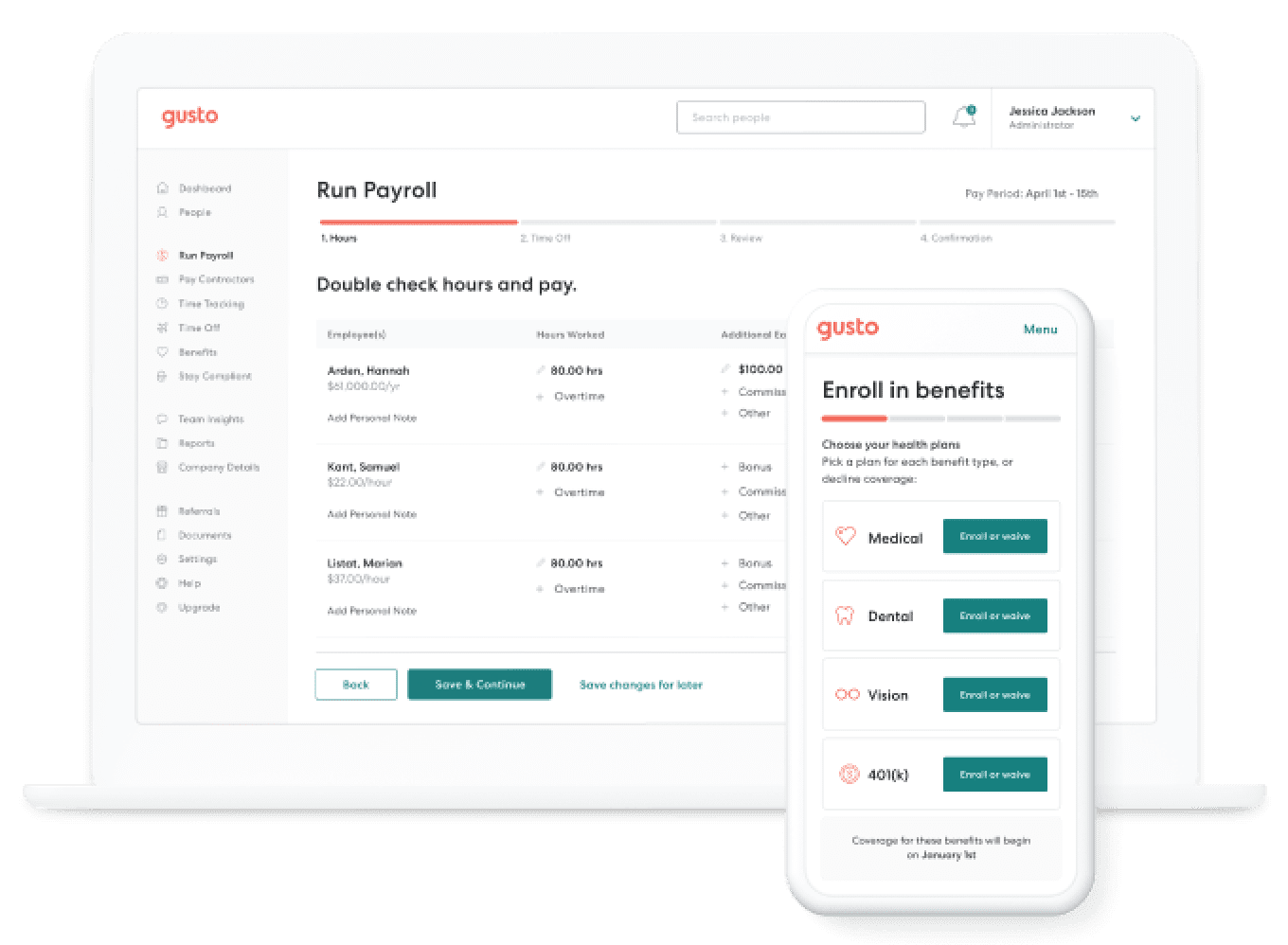
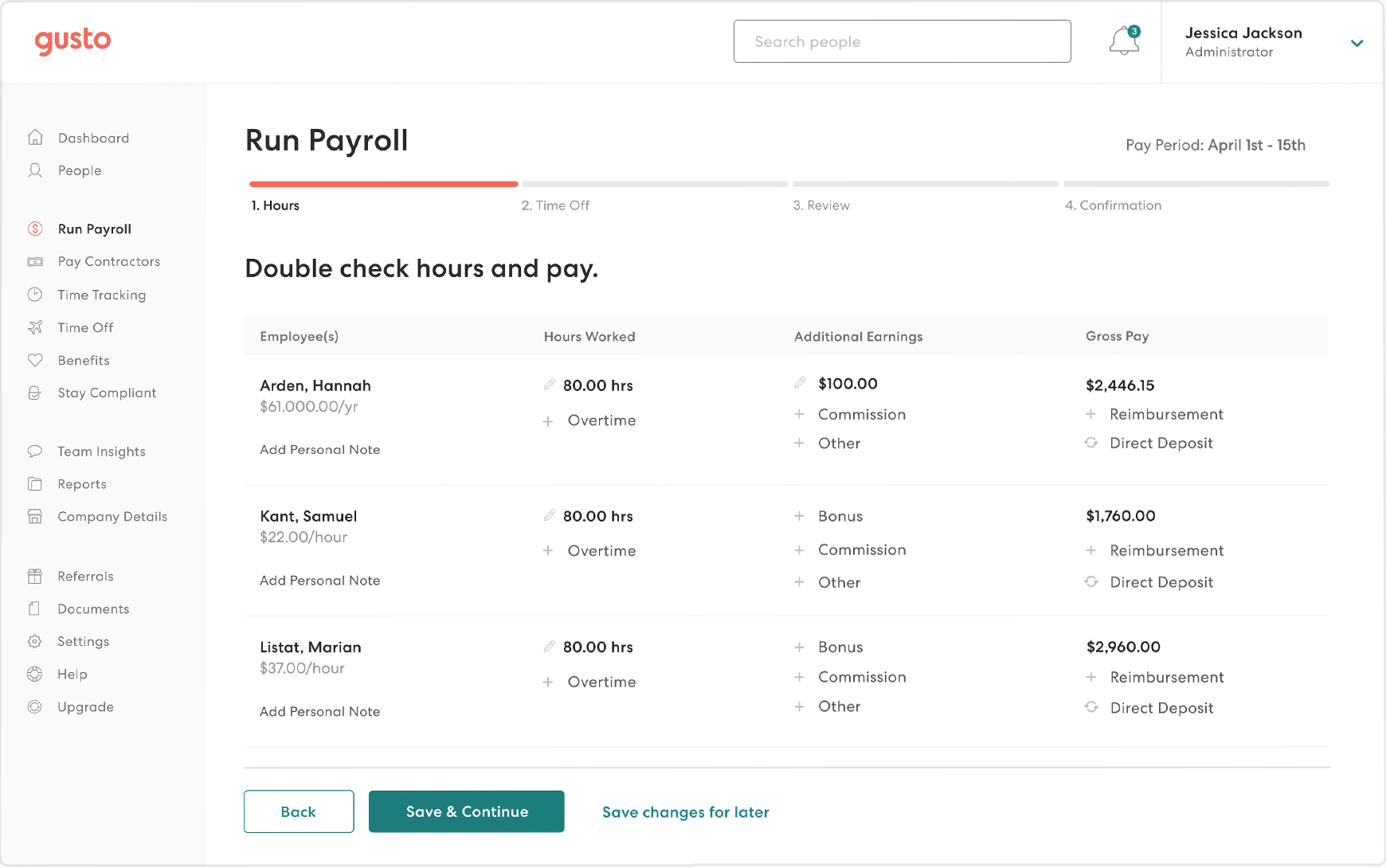
Gusto’s dashboard is clean and easy to use. New users can learn it quickly without training. Payroll setup guides simplify the first steps. Mobile access lets users manage payroll anywhere. Clear instructions help avoid mistakes during payroll runs.
Credit: gusto.com
Setting Up Your Gusto Account
Setting up your Gusto account is the first step to smooth payroll processing. The platform guides you through a simple setup. This ensures you manage payroll efficiently without hassle. Follow clear steps to get your account ready fast.
Creating Your Profile
Start by entering your business details. Provide your company name, address, and tax ID. This information helps Gusto tailor your payroll. Next, add your contact information. Double-check for accuracy to avoid issues later.
Adding Employees
Add employees one by one or upload a list. Include full names, addresses, and Social Security numbers. Set each employee’s pay schedule and payment type. This step ensures everyone gets paid on time.
Configuring Payment Preferences
Choose how you want to pay employees. Options include direct deposit or paper checks. Set your company’s bank account for payroll funds. Confirm payment dates to match your payroll cycle.
Running Payroll With Gusto
Running payroll with Gusto is simple and saves time. It helps small businesses pay employees correctly and on time. The process is clear, organized, and mostly automatic. This reduces mistakes and stress for business owners.
Gusto’s payroll system covers all key steps. From entering work hours to scheduling payments, each part is easy to manage. The platform also handles taxes, making payroll less confusing.
Entering Work Hours And Salaries
Start by entering employee work hours or set fixed salaries. Gusto allows manual input or time tracking integration. This keeps payroll accurate and up to date. You can review hours and make changes before finalizing payroll.
Calculating Taxes Automatically
Gusto calculates all payroll taxes for you. It includes federal, state, and local taxes. The system updates tax rates automatically. This ensures correct deductions and avoids penalties. Tax forms are also prepared for easy filing.
Scheduling Pay Runs
Set up pay runs on a schedule that fits your business. Weekly, biweekly, or monthly options are available. Gusto sends reminders before each payroll. You can approve payments with a few clicks. This keeps payments consistent and timely every pay period.
Handling Taxes And Compliance
Handling taxes and compliance is a key part of payroll processing. It keeps your business safe from fines and legal problems. Gusto Payroll helps manage these tasks with ease. It reduces mistakes and saves time. This section explains how Gusto supports tax filing, regulatory compliance, and year-end forms.
Tax Filing Made Simple
Gusto automates tax filings for federal, state, and local levels. It calculates the right tax amounts for each employee. The system submits payments and forms on your behalf. This reduces errors and late fees. You can track filings anytime through the dashboard. No need to worry about deadlines or complex forms.
Staying Compliant With Regulations
Payroll laws change often and vary by location. Gusto updates its system to match new rules. It helps businesses follow labor laws, tax laws, and benefits regulations. This lowers the risk of audits or penalties. You get alerts about important compliance changes. Gusto makes it easier to keep your payroll legal and fair.
Year-end Tax Forms
At year-end, Gusto prepares all necessary tax forms. It handles W-2s for employees and 1099s for contractors. The platform sends forms electronically or by mail. It also files forms with the IRS and state agencies. This process is fast and accurate. Employees can access their forms online anytime.
Managing Benefits And Deductions
Managing benefits and deductions is a key part of payroll processing. It ensures employees get the right benefits and the correct amounts are deducted from their paychecks. Gusto Payroll makes this process simple and clear. It helps businesses keep benefits and deductions organized and accurate.
Integrating Employee Benefits
Gusto Payroll connects employee benefits directly to payroll. Health insurance, retirement plans, and other benefits are added easily. This integration reduces errors and saves time. Employees see their benefits clearly on pay stubs. The system updates benefits automatically when changes occur.
Customizing Deductions
Businesses can set up custom deductions to fit their needs. This includes things like loan repayments, union fees, or charity contributions. Gusto allows flexible deduction rules for each employee. Deductions adjust automatically based on employee status or hours worked. This customization keeps payroll accurate and fair.
Tracking Contributions
Gusto tracks all employer and employee contributions in real time. This includes taxes, benefits, and savings plans. Reports show detailed contribution records for easy review. Tracking helps businesses stay compliant with laws. It also supports clear communication with employees about their contributions.
Gusto’s Support And Resources
Gusto offers strong support and many resources for payroll users. These tools help users solve problems quickly and learn how to use the system well. Support comes in several forms, making it easy to get help anytime.
Customer Service Options
Gusto provides customer service through phone, email, and chat. Users can reach out for quick answers or detailed help. Support staff are trained to explain payroll topics simply. Response times are usually fast to keep payroll on track.
Training And Tutorials
Gusto offers clear tutorials and training videos. These guides cover basic and advanced payroll tasks step-by-step. Users can watch videos or read articles at their own pace. Tutorials help users avoid mistakes and use features correctly.
Community And Forums
Gusto hosts community forums where users share tips and advice. This space allows users to ask questions and get answers from peers. It creates a helpful network for learning practical payroll solutions. Users often find real-life examples and helpful insights here.
Comparing Gusto With Other Payroll Services
Choosing the right payroll service is important for every business. Gusto is a popular choice, but many other options exist. Comparing these services helps find the best fit for your needs. Here, we look at Gusto alongside other payroll providers.
Pricing And Plans
Gusto offers clear pricing with several plans. It charges a base fee plus a cost per employee. Some competitors offer lower starting prices but add fees for extra features. Others include more features in their base price. Small businesses may prefer Gusto’s simple, predictable pricing. Larger companies might find other plans better for their budget.
Feature Differences
Gusto provides full-service payroll, tax filing, and benefits management. It also supports time tracking and employee onboarding. Some rivals focus only on payroll, missing extra tools. Others may offer advanced HR features, like performance reviews. Gusto’s strength is its all-in-one approach. Businesses needing specific tools might choose a specialized provider instead.
User Satisfaction
Many users praise Gusto for ease of use and customer support. Its user interface is clean and simple. Competitors sometimes have steeper learning curves. Some users find Gusto’s mobile app helpful. Reviews show satisfaction with quick tax filings. Other services may get mixed feedback on support and reliability. User satisfaction often depends on business size and needs.

Credit: en.wikipedia.org
Tips For Maximizing Gusto Payroll
Maximizing Gusto Payroll helps save time and avoid errors. Simple steps improve accuracy and efficiency. Use Gusto’s features fully to streamline payroll management. Here are some useful tips to get the best from Gusto.
Automating Routine Tasks
Set up automatic payroll runs for regular pay periods. Automate tax filings to meet deadlines without stress. Use direct deposit to pay employees quickly. Automation reduces manual work and cuts mistakes. It keeps payroll consistent and smooth every cycle.
Regular Account Reviews
Check your payroll data often for accuracy. Review employee hours, wages, and benefits regularly. Spot mistakes early to fix them fast. Update employee information when changes happen. Regular reviews keep your payroll clean and error-free.
Leveraging Reporting Tools
Use Gusto’s reports to track payroll costs and trends. Analyze reports to understand labor expenses better. Share reports with your accountant for easy tax filing. Reporting tools help make smart business decisions. They give clear insights into your payroll data.
Credit: www.softwareadvice.co.uk
Frequently Asked Questions
What Is Gusto Payroll Processing?
Gusto payroll processing automates employee payment, tax filing, and compliance tasks. It simplifies payroll management for small and medium businesses efficiently.
How Does Gusto Handle Tax Filing?
Gusto automatically calculates, withholds, and files federal, state, and local taxes. It ensures accurate tax payments and timely filings to avoid penalties.
Can Gusto Integrate With Accounting Software?
Yes, Gusto seamlessly integrates with popular accounting tools like QuickBooks and Xero. This improves financial accuracy and streamlines bookkeeping processes.
Is Gusto Suitable For Small Businesses?
Absolutely, Gusto is designed for small businesses offering affordable, user-friendly payroll and HR solutions tailored to their specific needs.
Conclusion
Gusto Payroll Processing simplifies paying employees. It saves time and reduces errors. Small businesses can manage payroll easily. Tax filings and compliance get handled smoothly. Employees enjoy quick and accurate payments. The platform supports growth without extra stress. Choose a tool that fits your needs.
Payroll doesn’t have to be complicated. Trust a system designed for busy teams. Gusto makes payroll straightforward and reliable.
