
Choosing the right tool to manage your business’s payroll and accounting can feel overwhelming. You want something reliable, easy to use, and that fits your unique needs.
That’s why comparing Gusto vs QuickBooks is so important. Both are popular choices, but which one will truly make your life easier? By the end of this article, you’ll know exactly which platform suits your business, saving you time, stress, and money.
Ready to find the perfect fit for your financial tasks? Let’s dive in.

Credit: gusto.com
Gusto Features
Gusto offers many features that help small businesses manage payroll and employees easily. The platform focuses on simplifying complex tasks. It combines payroll, benefits, and tax services in one place. This section explains Gusto’s main features to help you understand its value.
Payroll Management
Gusto automates payroll calculations and payments. It supports hourly and salaried employees. You can set up direct deposit with just a few clicks. The system tracks hours and overtime accurately. Employees receive pay stubs online instantly. Payroll reports are easy to generate for managers. This reduces errors and saves time.
Employee Benefits
Gusto offers a variety of employee benefits. Health insurance plans are available for small businesses. It also provides retirement savings options. Paid time off and workers’ compensation can be managed easily. Employees can enroll in benefits through a simple online portal. This helps businesses attract and keep good staff.
Tax Filing Services
Gusto handles federal, state, and local payroll taxes. It calculates taxes automatically and submits payments on time. Tax forms like W-2 and 1099 are generated and filed. This reduces the risk of costly penalties. The platform sends reminders about tax deadlines. It keeps tax compliance simple and stress-free.
User Interface And Experience
The Gusto interface is clean and easy to navigate. New users find it simple to set up accounts. The dashboard shows key information at a glance. Mobile access lets managers run payroll anywhere. Customer support is available through chat and phone. Overall, Gusto aims to make payroll tasks less complicated.
Credit: fitsmallbusiness.com
Quickbooks Features
QuickBooks offers a wide range of features designed to help small businesses manage their finances. It combines tools for accounting, payroll, invoicing, and reporting. These features work together to save time and reduce errors. QuickBooks aims to simplify financial tasks for business owners and their teams.
Accounting Capabilities
QuickBooks tracks income and expenses automatically. It organizes transactions and categorizes them clearly. Users can connect bank accounts and credit cards for easy updates. The software supports multiple currencies and tax calculations. It also helps with account reconciliation and budget planning.
Payroll Integration
Payroll is built right into QuickBooks. It calculates employee wages, taxes, and deductions accurately. The system files payroll taxes and sends payments on time. Users can manage employee benefits and track hours worked. Payroll data syncs smoothly with the accounting system for less work.
Invoicing And Payments
QuickBooks creates professional invoices fast. Users can customize templates with logos and colors. Customers can pay invoices online using credit cards or bank transfers. The software tracks payments and sends reminders for overdue bills. It helps businesses get paid quicker and manage cash flow.
Reporting Tools
QuickBooks offers clear and detailed financial reports. Users can view profit and loss statements, balance sheets, and cash flow reports. Reports can be customized by date, customer, or project. The software helps spot trends and make informed business decisions. Reports export easily to Excel or PDF formats.
Pricing Comparison
Understanding pricing helps small businesses choose the right payroll and accounting software. Gusto and QuickBooks offer different plans and fees. This section breaks down their costs clearly. It helps you see which option fits your budget best.
Subscription Plans
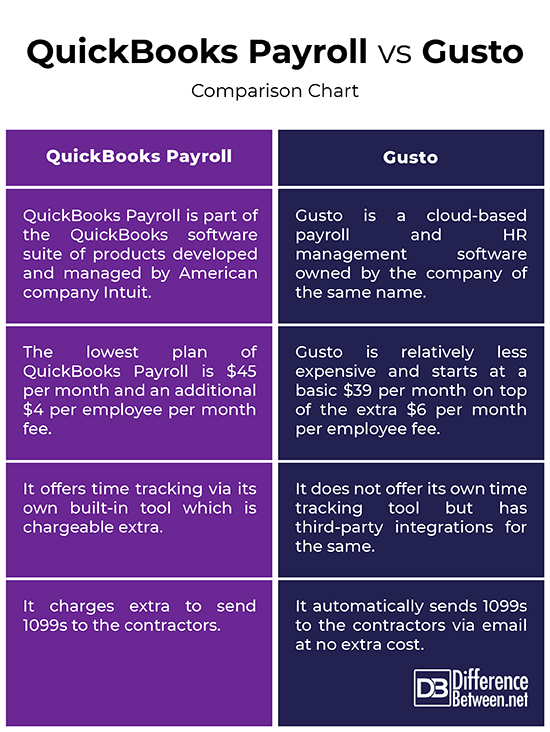
Gusto has three main plans. The Core plan costs $39 per month plus $6 per employee. The Complete plan is $39 plus $12 per employee. The Concierge plan is $149 plus $12 per employee. Each plan adds more features.
QuickBooks Payroll offers three plans too. The Core plan costs $45 per month plus $4 per employee. The Premium plan costs $75 plus $8 per employee. The Elite plan is $125 plus $10 per employee. Each plan includes more tools.
Additional Fees
Gusto charges extra for some services. Workers’ compensation insurance costs vary by state. There are no setup fees or hidden charges. QuickBooks charges a one-time setup fee for some payroll services. State tax payments and filings may cost extra. Both platforms charge for add-ons like tax penalty protection.
Value For Small Businesses
Gusto suits businesses needing easy payroll and benefits. Its plans cover hiring to health benefits. QuickBooks fits businesses wanting full accounting plus payroll. It links payroll with bookkeeping smoothly. Both offer good value, depending on business size and needs.
Ease Of Use
Ease of use is a key factor for anyone choosing payroll or accounting software. Both Gusto and QuickBooks aim to make tasks simple and fast. This section breaks down how easy each tool is to start, navigate, and get help with.
Setup Process
Gusto offers a quick and clear setup. Users fill out basic company information and add employees. The system guides through tax forms and payment schedules. It works well for small businesses without much accounting experience.
QuickBooks setup is detailed and requires more input. It asks about your business type, expenses, and income sources. This helps customize reports but can take longer. It suits users who want detailed financial tracking from the start.
Navigation And Accessibility
Gusto has a clean dashboard with clear menus. Users find payroll, benefits, and reports easily. The interface uses simple words and icons. It works well on phones and tablets, making it handy for on-the-go use.
QuickBooks has more features, so the dashboard looks busier. Menus cover payroll, invoicing, taxes, and more. Navigation takes time to learn. Mobile apps are available but can feel crowded on small screens.
Customer Support
Gusto provides support through phone, email, and chat. The team responds quickly and answers clearly. They help users through setup and any payroll questions.
QuickBooks offers phone, chat, and community forums. Support can be slower due to many users. The forums are useful for finding user tips and solutions.
Integration And Compatibility
Integration and compatibility matter a lot for payroll and accounting software. They decide how well the software works with other tools and systems. This section compares Gusto and QuickBooks in these areas. It helps you see which one fits best with your existing setup.
Third-party Apps
Gusto connects easily with many popular third-party apps. It works with tools for time tracking, benefits, and accounting. This helps keep all your business data in one place. QuickBooks also offers many app connections. It supports apps for invoicing, payments, and inventory. Both platforms help streamline workflows with these apps.
Platform Compatibility
Gusto runs smoothly on major web browsers and mobile devices. It supports Windows, Mac, iOS, and Android. This makes it easy to manage payroll on the go. QuickBooks also works well on desktop and mobile platforms. It offers dedicated apps for iPhone and Android. Users can access their accounts anytime and anywhere.
Data Import And Export
Importing and exporting data is simple with Gusto. You can upload employee information using CSV files. Export payroll reports easily for tax or accounting purposes. QuickBooks provides strong data import and export options too. It supports Excel, CSV, and PDF formats. This helps with record keeping and sharing data with accountants.
Security And Compliance
Security and compliance are vital for payroll and accounting software. Protecting sensitive data builds trust and avoids legal issues. Both Gusto and QuickBooks offer strong features to keep your information safe and follow rules.
Data Protection Measures
Gusto encrypts data with advanced technology. It uses firewalls and secure servers. QuickBooks also applies encryption to protect user data. Both platforms have multiple layers of security. They prevent unauthorized access and data breaches.
Regulatory Compliance
Gusto complies with payroll and tax laws across states. It updates automatically for new regulations. QuickBooks meets federal and state tax requirements too. Both systems help businesses stay legally compliant. This reduces risks of fines or penalties.
Audit Trails
Gusto keeps detailed records of all actions taken. It tracks changes in payroll and employee info. QuickBooks offers logs of user activities and edits. These audit trails help identify errors or fraud. They provide transparency and accountability for businesses.
Pros And Cons
Choosing between Gusto and QuickBooks depends on your business needs. Both have advantages and disadvantages. Knowing their pros and cons helps you decide which fits best. Here, we break down the key strengths and weaknesses of each platform.
Strengths Of Gusto
Gusto excels in payroll management. It automates tax calculations and filings smoothly. The user interface is clean and easy to use. It offers strong employee benefits options. Customer support is fast and helpful. Gusto integrates well with many accounting apps.
Weaknesses Of Gusto
Gusto can be expensive for small businesses. It lacks advanced accounting features. Customization options are limited. Some users report occasional software glitches. It focuses mainly on payroll and HR, not full accounting.
Strengths Of Quickbooks
QuickBooks provides robust accounting tools. It handles invoicing, expenses, and taxes efficiently. The software offers detailed financial reports. It suits businesses needing full accounting solutions. QuickBooks has many integrations and add-ons. It also supports payroll through add-ons.
Weaknesses Of Quickbooks
QuickBooks payroll setup can be complex. The learning curve is steeper for beginners. Customer support may be slow at times. Payroll features are not as intuitive as Gusto’s. The pricing structure can become costly with add-ons.
Credit: www.differencebetween.net
Best Use Cases
Choosing the right software depends on your business needs. Both Gusto and QuickBooks serve different purposes. Understanding their best use cases helps in making the right choice.
Ideal Businesses For Gusto
Gusto works well for small to medium businesses focused on payroll. It simplifies paying employees and managing taxes. Startups and companies with remote workers find Gusto helpful. Businesses wanting easy health benefits and compliance support benefit from Gusto. It suits firms needing straightforward employee onboarding and time tracking.
Ideal Businesses For Quickbooks
QuickBooks fits businesses that need strong accounting tools. Small businesses managing invoices, expenses, and cash flow use it. Freelancers and contractors track income and file taxes easily. Companies that require detailed financial reports choose QuickBooks. It works well for businesses wanting integrated bookkeeping and inventory management.
Frequently Asked Questions
What Are The Main Differences Between Gusto And Quickbooks?
Gusto specializes in payroll and HR management. QuickBooks focuses on accounting and bookkeeping. Gusto offers benefits administration, while QuickBooks integrates invoicing and expense tracking. Both help small businesses but serve distinct financial and HR needs.
Is Gusto Better For Payroll Than Quickbooks?
Yes, Gusto provides a more comprehensive payroll service. It automates tax filings, direct deposits, and employee onboarding. QuickBooks offers payroll but with fewer HR features. Gusto is preferred for businesses prioritizing payroll and employee management.
Can Quickbooks Handle Payroll Like Gusto?
QuickBooks can manage payroll but with limited HR tools. It offers basic payroll functions and tax calculations. Gusto provides deeper HR support and benefits administration. For full-service payroll, Gusto is generally the stronger choice.
Which Software Integrates Better With Accounting Tools?
QuickBooks is designed primarily as accounting software and integrates smoothly with many financial tools. Gusto integrates well with QuickBooks and other accounting platforms but focuses on payroll. QuickBooks offers broader accounting and financial reporting capabilities.
Conclusion
Choosing between Gusto and QuickBooks depends on your needs. Gusto excels in payroll and employee benefits. QuickBooks works well for accounting and bookkeeping tasks. Both offer easy-to-use tools for small businesses. Consider your budget and which features matter most. Trying free trials can help you decide.
Think about what fits your business size and goals. Either way, both platforms support smooth financial management. Choose the one that feels right for your team. Simple, clear, and effective—your business deserves that.
