
Choosing the right accounting software can feel overwhelming. You want a tool that makes your financial tasks easier, saves you time, and fits your business needs perfectly.
QuickBooks, Sage, and Xero are three of the top choices out there—but which one is truly the best for you? This comparison will break down the strengths and weaknesses of each, helping you make a confident decision. Keep reading to discover which software will give your business the edge it deserves.
Key Features Comparison
Choosing the right accounting software depends on the features it offers. QuickBooks, Sage, and Xero each have strengths. Comparing their key features helps you find the best fit. Below, we explore their capabilities in invoicing, expense tracking, payroll, inventory, and reporting.
Invoicing And Billing
QuickBooks offers customizable invoices and automatic reminders. Sage provides simple invoice templates and supports multiple currencies. Xero allows easy invoice creation with online payment options. All three help businesses get paid faster.
Expense Tracking
QuickBooks lets users snap photos of receipts and tracks expenses automatically. Sage simplifies expense entry and categorizes costs. Xero connects bank feeds to record expenses in real time. Each tool makes expense management easier.
Payroll Management
QuickBooks includes built-in payroll features for employee payments and tax filing. Sage offers payroll integration but may require add-ons. Xero provides payroll tools with automated tax calculations. Payroll support varies but covers basic needs.
Inventory Control
QuickBooks tracks inventory levels and updates stock automatically. Sage manages inventory with detailed reporting and order tracking. Xero supports inventory tracking but with fewer advanced options. Inventory control suits small to mid-sized businesses.
Reporting And Analytics
QuickBooks delivers customizable financial reports and dashboards. Sage offers standard reports and some customization. Xero provides real-time financial data and visual reports. Reporting helps businesses monitor health and make decisions.

Credit: x3consulting.com
User Interface And Experience
User interface and experience play a big role in choosing accounting software. It affects how fast users learn and how well they manage their tasks. A simple, clear design helps reduce errors and saves time. QuickBooks, Sage, and Xero each offer different interfaces and experiences. Understanding these differences helps pick the right tool.
Ease Of Navigation
QuickBooks has a clean and straightforward layout. Menus are easy to find and use. Users can access important features within a few clicks. Sage uses a more traditional layout with many options on the dashboard. It may take some time to get used to. Xero offers a simple and modern design. Navigation is smooth with clear icons and labels. This helps new users feel comfortable quickly.
Customization Options
QuickBooks allows users to customize dashboards and reports. This helps focus on the most important data. Sage offers deeper customization for advanced users. It supports tailored workflows and reports. Xero provides basic customization options. Users can adjust some settings but with fewer choices than Sage. Customization depends on the user’s needs and skills.
Mobile App Functionality
QuickBooks mobile app is powerful and easy to use. It supports invoicing, expense tracking, and reports. Sage’s mobile app is less feature-rich but covers essential tasks. It works well for quick updates on the go. Xero’s app is user-friendly and reliable. It includes bank reconciliation and invoice management features. Mobile apps from all three improve work flexibility.
Pricing And Plans
Choosing the right accounting software depends a lot on pricing and plans. Each option offers different features at different costs. Understanding these can help you pick the best fit for your business budget and needs. Let’s break down the costs and what you get with QuickBooks, Sage, and Xero.
Subscription Costs
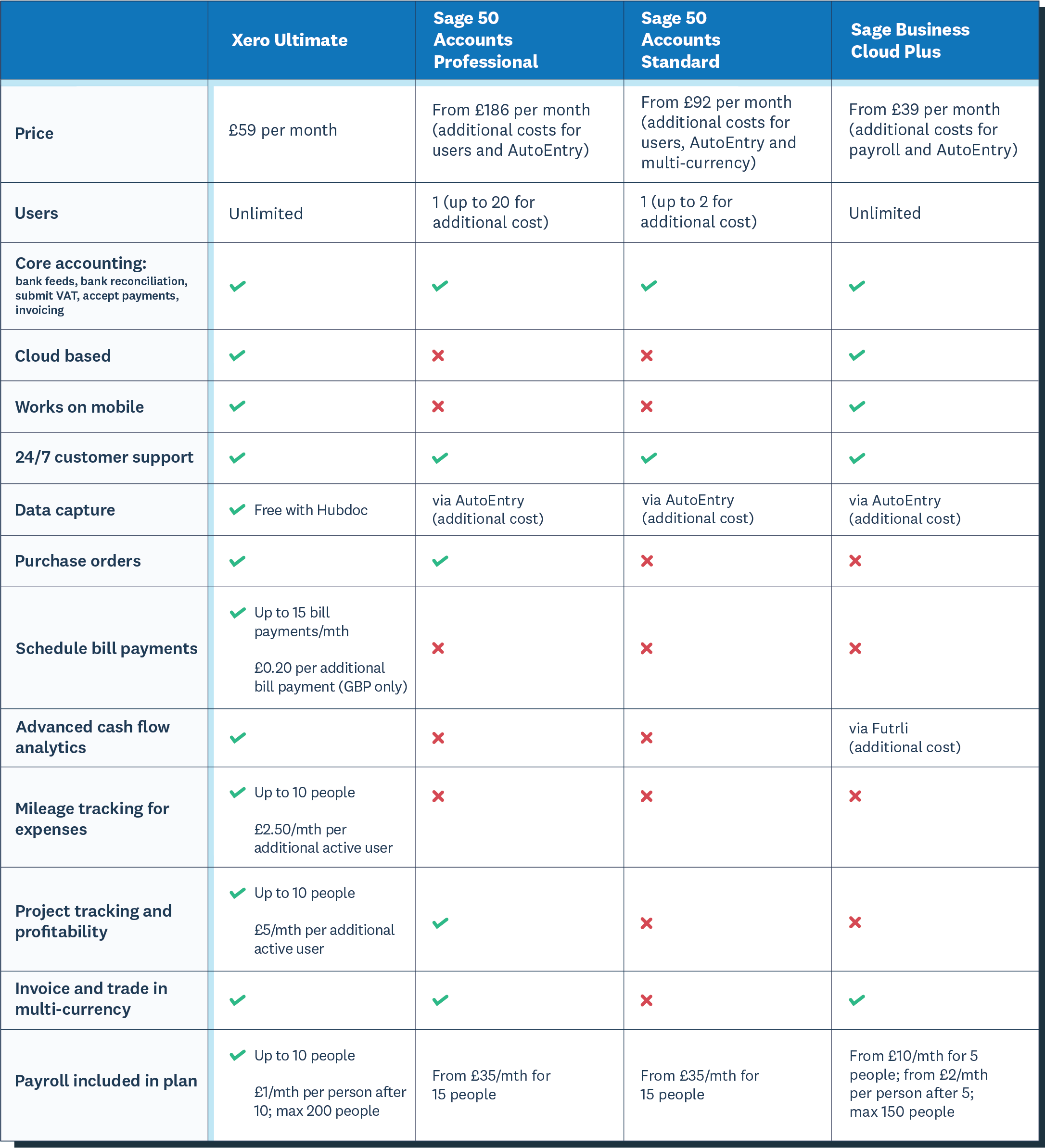
QuickBooks offers multiple plans starting at a low monthly fee. The cost rises with added features and users. Sage has pricing tiers that focus on small to medium businesses. Its plans vary based on the tools included. Xero charges a monthly fee too, with three main plans. Each plan supports different numbers of invoices and users.
Additional Fees
QuickBooks may charge extra for payroll and advanced reports. Sage sometimes requires add-ons for extra users or support. Xero charges for add-ons like payroll and payment processing. These fees can add up if you need more than basic features. Always check for hidden costs before choosing a plan.
Free Trial And Demo Availability
QuickBooks offers a 30-day free trial without a credit card. Sage provides a free demo to explore the software features. Xero gives a 30-day free trial with full access. Trying these options helps you understand which software suits your needs. Testing before buying reduces the risk of overspending.

Credit: www.cledara.com
Integration And Compatibility
Integration and compatibility play a big role in choosing accounting software. These features help connect your software with other tools and services. Smooth integration saves time and reduces errors. It also allows data to flow easily between systems. QuickBooks, Sage, and Xero all offer different levels of integration and compatibility. Understanding these differences helps pick the best fit for your business.
Third-party Apps
QuickBooks supports a large number of third-party apps. This makes it easy to add features like payroll, inventory, and CRM. Sage also offers many app integrations but fewer than QuickBooks. Xero shines with its open API, allowing many developers to create apps. Each platform supports popular tools, but QuickBooks leads in sheer volume. Check if your needed apps work smoothly before choosing.
Bank And Payment Gateways
Bank connections matter for automatic transaction imports. QuickBooks connects with thousands of banks worldwide. Sage supports a wide range of banks but is stronger in certain regions. Xero offers easy bank feeds and supports many payment gateways. All three make bank reconciliation faster. Look for your local bank and payment provider compatibility to avoid manual work.
Platform Support
QuickBooks works on Windows, Mac, and mobile devices. Sage offers desktop and cloud versions, with strong Windows support. Xero is cloud-based and accessible from any device with internet. Mobile apps for QuickBooks and Xero offer on-the-go access. Sage’s mobile options are improving but more limited. Choose software that fits your devices and working style best.
Customer Support And Resources
Customer support and resources play a key role in choosing accounting software. They help users solve problems fast and learn new features easily. QuickBooks, Sage, and Xero each offer different support options and learning materials. Understanding these can help users pick the best fit for their needs.
Support Channels
QuickBooks offers phone, chat, and email support. Users can reach agents during business hours. Sage provides phone support and online chat. Their service is reliable but limited to certain hours. Xero relies mainly on email and online chat. It does not offer phone support, which might delay urgent help.
Help Documentation
QuickBooks has detailed guides and step-by-step tutorials. The articles cover a wide range of topics. Sage also provides thorough documentation with clear instructions. Their knowledge base is easy to search. Xero offers an extensive help center with articles and videos. The content is simple and organized for quick reading.
Community And Training
QuickBooks hosts an active community forum where users share tips. They also provide webinars and online courses. Sage offers training sessions and a user community for support. Their forums are helpful for finding solutions. Xero has a vibrant online community and regular training webinars. Users can learn from experts and peers alike.
Credit: www.xero.com
Security And Compliance
Security and compliance are vital for any accounting software. Protecting financial data helps avoid costly breaches. Following laws ensures smooth business operations and trust.
Data Protection Measures
QuickBooks, Sage, and Xero use strong encryption to protect data. They offer multi-factor authentication for safer account access. Regular security updates fix vulnerabilities quickly. User roles limit who can see sensitive data. These steps reduce risks of data theft or loss.
Regulatory Compliance
All three platforms meet major financial regulations like GDPR and HIPAA. They support tax compliance with automated reports. QuickBooks and Sage adjust settings for different countries. Xero offers tools for local tax rules too. Compliance features help avoid fines and audits.
Backup And Recovery
QuickBooks, Sage, and Xero store data in secure cloud servers. They run frequent backups to prevent data loss. In case of failure, data can be quickly restored. Users can access past records anytime. This ensures business continuity without interruptions.
Best Use Cases
Choosing the right accounting software depends on your business needs. QuickBooks, Sage, and Xero serve different purposes. Each works best in certain cases. Understanding these helps you pick the right tool.
Below are the best use cases for each software. This guide focuses on business size, industry features, and growth potential.
Business Size Suitability
QuickBooks fits small to medium businesses well. It has easy setup and simple features. Sage suits small to large businesses. It offers more control and customization. Xero targets small businesses and startups. It is user-friendly and cloud-based.
Industry Specific Features
QuickBooks supports retail, services, and freelancers with strong invoicing. Sage works well in manufacturing and construction with detailed inventory tools. Xero offers features for nonprofits and small shops, including payroll and project tracking.
Scalability
QuickBooks grows with businesses but may need upgrades. Sage scales well for larger companies needing advanced functions. Xero handles growth smoothly for small firms moving to medium size. All three offer cloud access for easy updates.
Frequently Asked Questions
What Are The Main Differences Between Quickbooks, Sage, And Xero?
QuickBooks offers user-friendly features for small businesses. Sage is ideal for medium to large firms needing robust accounting. Xero focuses on cloud-based, real-time collaboration. Each varies in pricing, scalability, and integrations, catering to different business sizes and needs.
Which Software Is Best For Small Businesses?
QuickBooks is best for small businesses due to its simplicity and extensive features. It provides easy invoicing, expense tracking, and tax support. Xero also suits small businesses with its cloud accessibility. Sage is generally better for larger, more complex operations.
How Do Pricing Plans Compare Among Quickbooks, Sage, And Xero?
QuickBooks offers tiered plans starting affordable for small businesses. Sage has flexible pricing, often higher, fitting larger enterprises. Xero provides simple monthly pricing with unlimited users. Pricing depends on features, user count, and business needs.
Can These Platforms Integrate With Other Business Tools?
Yes, all three platforms support integrations. QuickBooks connects with payment processors, CRM, and payroll. Sage integrates with Microsoft apps and industry-specific tools. Xero links with over 800 third-party apps, enhancing functionality for various workflows.
Conclusion
Choosing between QuickBooks, Sage, and Xero depends on your business needs. Each software offers unique tools and features. QuickBooks suits small businesses with simple accounting. Sage works well for larger companies needing advanced options. Xero provides a user-friendly experience and strong cloud support.
Think about your budget, business size, and ease of use. Trying free trials can help decide which fits best. The right choice will simplify your accounting tasks and save time. Focus on what matters most for your company’s growth.
