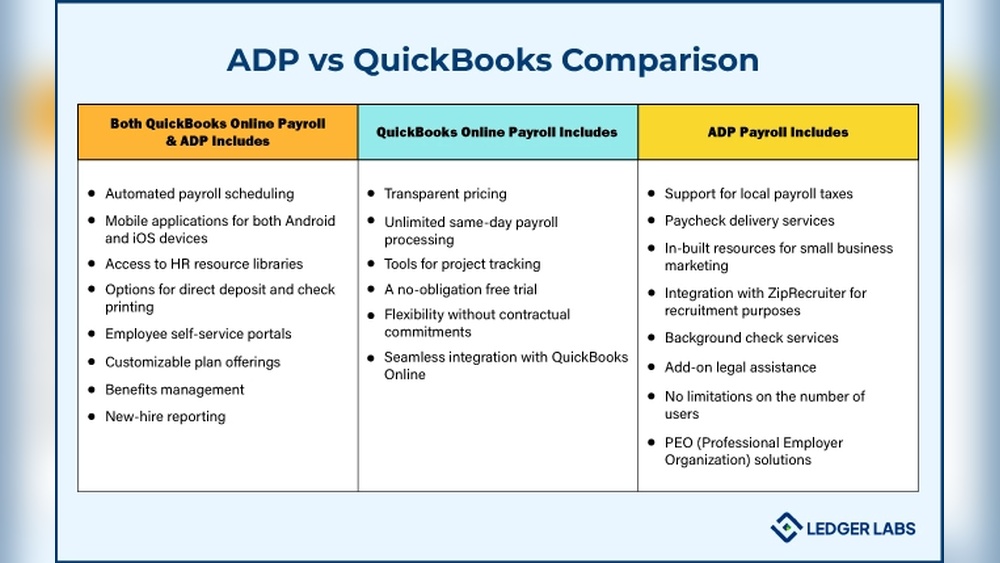

Choosing the right payroll system can feel overwhelming, especially when you want something reliable and easy to use. You might have heard of ADP and QuickBooks Payroll, but which one truly fits your business needs?
This article will help you understand the key differences and benefits of each, so you can make a confident decision. By the end, you’ll know exactly which payroll solution will save you time, reduce stress, and keep your employees happy.
Keep reading to find out which one is the perfect match for your business.

Credit: quickbooks.intuit.com
Adp Payroll Features
ADP offers multiple payroll processing options that suit different business needs. You can run payroll weekly, biweekly, or monthly. It also supports direct deposit and paper checks. Tax filing services are included, handling federal, state, and local taxes. This helps avoid penalties and saves time.
Employees can use a self-service portal to view pay stubs, update information, and access tax forms. This reduces questions to HR and speeds up communication. Mobile access and apps let managers and employees check payroll anytime, anywhere. The app is easy to use and works on most phones.
Quickbooks Payroll Features
QuickBooks Payroll offers payroll automation to save time. It calculates employee pay, taxes, and deductions automatically. This helps reduce errors and ensures timely payments.
Tax compliance is built in. The system files federal and state taxes for you. It also generates tax forms like W-2s and 1099s, keeping your business compliant.
Integration with QuickBooks Accounting allows seamless data flow. Payroll information updates your accounting records instantly. This saves manual entry and keeps finances accurate.
Access payroll tools on both mobile and desktop. Manage payroll anytime, anywhere. The user-friendly interface works on phones, tablets, and computers.
Pricing Comparison
ADP and QuickBooks Payroll offer different subscription plans. ADP’s plans start higher but include more services. QuickBooks has affordable plans good for small businesses. Both charge extra for more employees or special features.
Additional fees may apply for tax filing or garnishments. ADP often charges setup fees, while QuickBooks might add fees for live support. Check each service carefully to avoid surprises.
Free trials are available from both. QuickBooks offers a 30-day free trial. ADP’s trial length varies and may require a call. Discounts often come with yearly plans or bundling other services.
Ease Of Use
ADP and QuickBooks Payroll both offer easy-to-use platforms, but their interfaces differ. ADP has a clean, simple layout that guides users step-by-step. QuickBooks Payroll feels familiar to those who use QuickBooks accounting software. It integrates payroll smoothly with other financial tasks.
Setting up ADP involves following clear instructions and entering basic company details. QuickBooks Payroll setup is quick, especially for existing QuickBooks users. Both systems offer automated tools to reduce errors during setup.
| Feature | ADP | QuickBooks Payroll |
|---|---|---|
| Customer Support | Available 24/7 by phone and chat | Support mainly during business hours |
| Help Resources | Detailed guides and video tutorials | Extensive FAQs and community forum |
| Ease of Contact | Direct access to support reps | Support through QuickBooks app |
Scalability And Business Size
QuickBooks Payroll suits small businesses with simple payroll needs. It is easy to set up and use. The costs are low, making it good for startups or companies with few employees. It offers basic features like tax filing and direct deposit.
ADP works well for growing companies that need more tools. It can handle more employees and complex payroll tasks. ADP provides options for time tracking, benefits, and compliance support. This helps businesses that plan to expand quickly.
Enterprise solutions from ADP are designed for large businesses. These solutions offer custom payroll services, advanced reporting, and integration with other systems. They support thousands of employees and complex payroll rules.
Integration And Compatibility
ADP and QuickBooks Payroll both work well with many popular accounting software. QuickBooks Payroll is designed to sync smoothly with QuickBooks Accounting. ADP supports a wide range of software, giving more options for users.
Both payroll services connect with third-party apps like time tracking and HR tools. This helps businesses keep all their systems working together. ADP often has more third-party app choices, but QuickBooks Payroll covers the basics well.
| Compatibility | ADP | QuickBooks Payroll |
|---|---|---|
| Accounting Software | Works with many types | Best with QuickBooks |
| Third-Party Apps | Wide range available | Common apps supported |
| Hardware | Supports most devices | Compatible with basic devices |
Both systems support common hardware like printers and card readers. ADP may have extra options for larger businesses. QuickBooks Payroll fits smaller setups well.
Security And Compliance
Data protection is key for both ADP and QuickBooks Payroll. They use strong encryption to keep your data safe. Your payroll info stays private and secure. Access controls limit who can see sensitive details.
Both services follow strict laws and rules to protect your business. They meet important regulatory standards like GDPR and HIPAA. This helps avoid fines and keeps your company honest.
| Feature | ADP | QuickBooks Payroll |
|---|---|---|
| Audit Tools | Detailed logs for tracking changes | Simple reports for payroll activities |
| Reporting | Customizable reports for compliance | Easy-to-read payroll summaries |
| Data Backup | Automatic daily backups | Cloud backups with secure storage |
User Reviews And Ratings
Customer satisfaction varies between ADP and QuickBooks Payroll. ADP users often praise its reliability and strong customer support. QuickBooks Payroll is liked for its ease of use and integration with accounting tools.
Common complaints about ADP include complex pricing and slow setup. QuickBooks users sometimes mention limited features in lower plans and occasional software bugs.
Positive feedback highlights ADP’s comprehensive payroll options and scalability. QuickBooks Payroll is favored for its simple interface and fast payroll processing. Both platforms receive good marks for tax filing accuracy.
Choosing The Right Payroll
Assess your business needs before choosing payroll software. Small businesses may want simple tools. Larger companies need more features like tax filing and direct deposit. Consider the number of employees and payroll frequency. Check if you want integration with accounting software.
Budget matters. ADP often costs more but offers more services. QuickBooks Payroll is usually cheaper and good for small to mid-sized firms. Think about monthly fees and extra charges for add-ons.
Plan for future growth. Choose software that can grow with your business. ADP handles complex payroll and many employees well. QuickBooks is great for growing businesses but may need upgrades as you expand.
Credit: theledgerlabs.com
Credit: www.adp.com
Frequently Asked Questions
What Are The Main Differences Between Adp And Quickbooks Payroll?
ADP offers comprehensive payroll and HR services, ideal for large businesses. QuickBooks Payroll integrates seamlessly with QuickBooks accounting, perfect for small to mid-sized companies needing simple payroll solutions.
Which Payroll Service Is More Cost-effective For Small Businesses?
QuickBooks Payroll is generally more affordable for small businesses. ADP’s pricing is higher but includes advanced features and support, suitable for larger organizations with complex payroll needs.
How Easy Is It To Use Adp Versus Quickbooks Payroll?
QuickBooks Payroll is user-friendly with an intuitive interface. ADP has a steeper learning curve but provides robust customization and HR tools for experienced users.
Can Adp And Quickbooks Payroll Handle Tax Filings Automatically?
Yes, both ADP and QuickBooks Payroll offer automatic tax calculations and filings, ensuring compliance and reducing errors for businesses of all sizes.
Conclusion
Choosing between ADP and QuickBooks Payroll depends on your business needs. ADP offers strong features for larger companies with complex payroll. QuickBooks Payroll suits small businesses wanting easy accounting integration. Both handle taxes and compliance well. Think about your budget and support needs.
Test each platform if possible. The right choice simplifies payroll and saves time. Your decision can improve how you manage employee pay.
