

Are you struggling to keep your expenses organized in QuickBooks? Knowing how to categorize your expenses correctly can save you time, reduce stress during tax season, and give you a clear picture of your business’s financial health.
In this guide, you’ll discover simple steps to sort your expenses easily and accurately. By the end, you’ll feel confident managing your books like a pro—and avoid costly mistakes. Keep reading to unlock the secrets to mastering expense categorization in QuickBooks.
Credit: www.docuclipper.com
Setting Up Expense Categories
Choosing the right accounts helps keep your expenses clear and organized. QuickBooks offers many default categories like Utilities, Office Supplies, and Travel. Pick categories that match your business needs. Customizing expense categories lets you create names that fit your spending better. For example, change “Travel” to “Client Travel” for more detail. Using subaccounts adds even more detail under main categories. For instance, under Office Supplies, create subaccounts like Paper and Ink. This helps track spending exactly. Clear categories make reports easier to read and understand. It also helps during tax time. Keep categories simple but specific enough to track your money well.

Credit: www.youtube.com
Recording Expenses Accurately
QuickBooks helps you record expenses clearly by entering bills and receipts. Start by typing the bill details such as date, amount, and vendor name. This keeps your spending organized and easy to track.
Link each expense to a specific vendor. This helps you know who you paid and when. It also makes it easier to check payments later.
Attach supporting documents like receipts or invoices to each entry. This keeps proof of purchase handy. You can upload files or take pictures directly in QuickBooks.
| Step | Action | Benefit |
|---|---|---|
| 1 | Enter bills and receipts | Tracks all expenses accurately |
| 2 | Link expenses to vendors | Keeps payment records clear |
| 3 | Attach supporting documents | Stores proof for each expense |
Leveraging Quickbooks Features
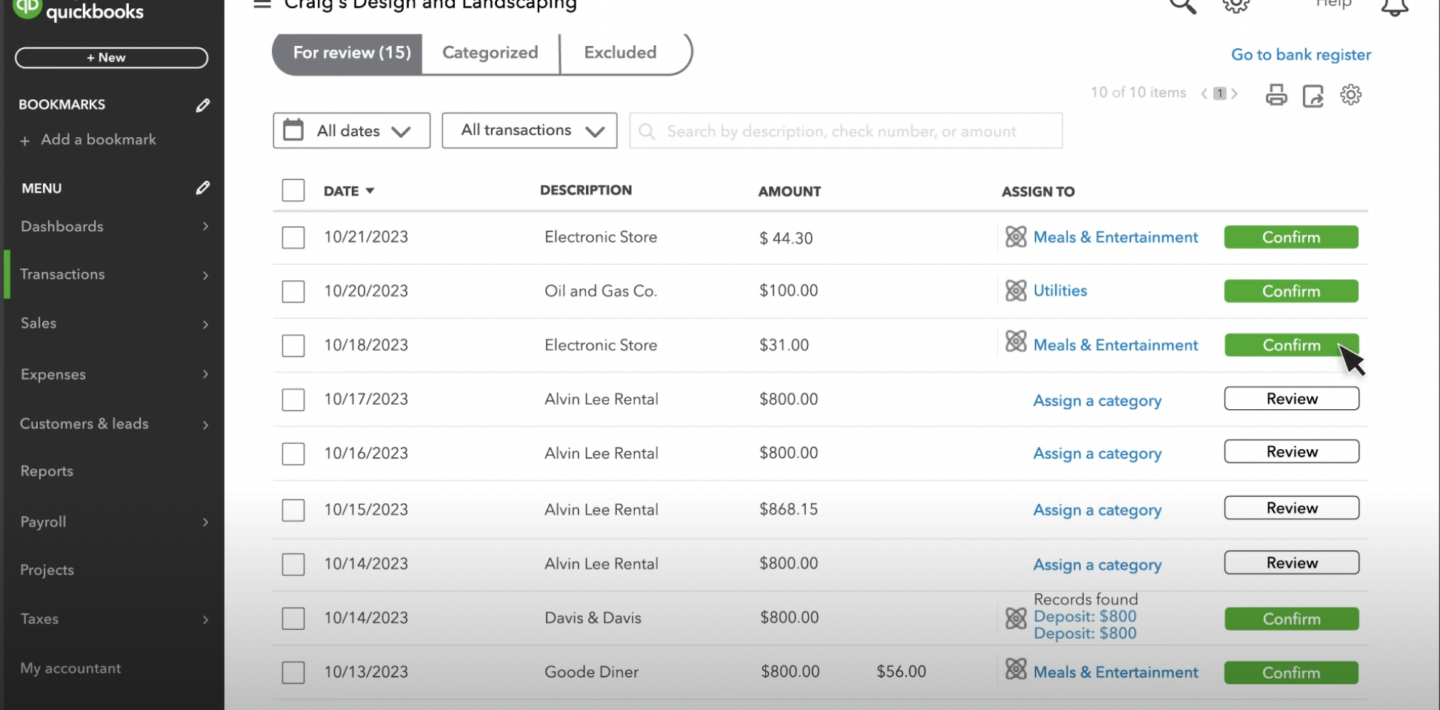
QuickBooks lets you set rules to sort expenses automatically. You create rules based on payee names, amounts, or other details. This saves time and reduces mistakes.
Bank feeds link your bank account to QuickBooks. It imports transactions daily. You can match these with existing expenses to keep records accurate. This helps track money flow easily.
Expenses can be tracked by projects or classes. Assigning these labels shows where money goes. It helps in knowing the cost of each project or department. A clear view of spending helps in budgeting.

Credit: quickbooks.intuit.com
Common Mistakes To Avoid
Misclassifying expenses can cause confusion in your reports. Each cost should fit in the right category. This helps track spending and budget well. Avoid putting personal costs as business expenses.
Ignoring reconciliation means bank accounts may not match QuickBooks data. Check transactions often. This keeps records clean and avoids mistakes.
Overlooking tax-deductible categories leads to missed savings. Mark expenses like office supplies, travel, and utilities correctly. This lowers your taxable income and saves money.
Tips For Efficient Expense Management
Regularly reviewing expense reports helps spot errors and keep budgets on track. Check reports weekly or monthly. This saves time and avoids surprises. Clear categories make reports easy to read and understand.
Setting up alerts and reminders ensures no expense goes unnoticed. QuickBooks can send notifications for due payments or unusual costs. These alerts help maintain control and avoid late fees.
Collaborating with your accountant improves expense tracking accuracy. Share reports and ask questions often. Accountants can suggest better category setups. Working together helps keep finances organized and clear.
Frequently Asked Questions
How Do I Create Expense Categories In Quickbooks?
To create expense categories, go to the Chart of Accounts. Click “New,” select “Expense,” then name your category. Save it for easy tracking and reporting.
Why Categorize Expenses Accurately In Quickbooks?
Accurate expense categorization helps track spending, manage budgets, and prepare tax reports. It ensures financial clarity and improves decision-making.
Can I Edit Expense Categories After Creation?
Yes, you can edit expense categories anytime. Go to Chart of Accounts, select the category, click “Edit,” make changes, and save.
How Do I Assign Expenses To Categories In Quickbooks?
When entering expenses, select the appropriate category from the “Account” dropdown. This organizes your spending and simplifies financial analysis.
Conclusion
Categorizing expenses in QuickBooks helps keep finances clear and organized. It saves time during tax season and improves budget tracking. Use clear categories that match your business needs. Regularly review your entries to avoid mistakes. This simple habit supports better financial decisions and growth.
Start categorizing today for easier money management tomorrow.
