

Are you struggling to keep your customer data organized while managing your finances in QuickBooks? Finding the best CRM software that integrates seamlessly with QuickBooks can save you time, reduce errors, and help you grow your business faster.
Imagine having all your customer information, sales tracking, and financial data working together smoothly—making your daily tasks simpler and your decisions smarter. You’ll discover top CRM options designed to fit perfectly with QuickBooks, so you can boost your productivity and focus on what really matters: growing your business.
Keep reading to find the perfect CRM solution tailored just for you.
Why Integrate Crm With Quickbooks
Integrating CRM with QuickBooks helps save time and reduce errors. Sales data moves automatically to accounting. No need to enter data twice. This keeps records accurate and up to date.
Customer details stay organized and easy to find. Teams can see sales, payments, and contact info in one place. This helps serve customers better and faster.
| Benefit | How It Helps |
|---|---|
| Streamlining Sales and Accounting | Auto-syncs sales with invoices and payments |
| Enhancing Customer Data Management | Keeps all customer info clear and accessible |
Key Features To Look For
Seamless QuickBooks Sync means your CRM and QuickBooks share data easily. This saves time and stops mistakes. Sync customer info, invoices, and payments without extra work. It keeps records accurate and up-to-date.
User-Friendly Interface helps everyone use the software without trouble. Clear menus and simple buttons make tasks quick. No need to learn hard commands or codes. It suits small teams and busy users well.
Automation Capabilities reduce manual work by handling tasks automatically. Send reminders, update records, and create invoices fast. Automation cuts errors and lets you focus on important work.
Customizable Reporting lets you create reports that fit your needs. Choose what info to see and how to view it. Reports help understand sales, expenses, and customer trends easily.
Top Crm Software Compatible With Quickbooks
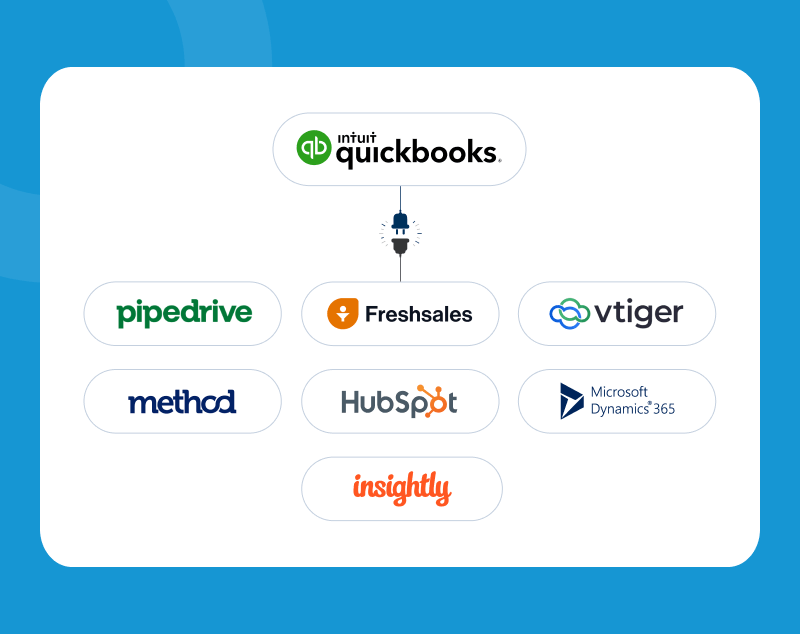
HubSpot CRM offers easy integration with QuickBooks. It helps track sales and manage contacts without hassle. The free plan suits small businesses well.
Zoho CRM connects smoothly with QuickBooks. It provides tools for sales, marketing, and customer support. This CRM suits growing businesses needing more features.
Salesforce Essentials fits small teams needing QuickBooks sync. It offers automation and customer tracking. The platform is user-friendly and reliable.
Insightly links with QuickBooks for better project and contact management. It helps keep customer data organized in one place.
Pipedrive integrates with QuickBooks to simplify sales tracking. Its visual pipeline is easy to use and helps close deals faster.
Credit: croclub.com
Comparing Pricing And Plans
Many CRM options offer free plans, but they have limited features. Paid plans give more tools and support. Free versions work well for basic needs or testing software.
Subscription tiers usually start with basic, then standard, and premium. Each step adds more features like automation or extra users. Prices go up with more options.
| Plan Type | Features | Best For | Price Range |
|---|---|---|---|
| Free | Basic contacts and tasks | Very small businesses | $0 |
| Basic | More contacts, email support | Small teams | $10-$20/month |
| Premium | Automation, integrations, reports | Growing businesses | $30-$50/month |
Small businesses get the best value by choosing plans with essential features. Overpaying for extras is not needed. Start small and upgrade as business grows.
Tips For Choosing The Right Crm
Assess business needs clearly. Know what tasks the CRM must handle. Focus on features that help daily work. Avoid paying for tools you won’t use. Understanding your team’s workflow is key. This saves time and money.
Check integration depth with QuickBooks. Ensure data flows smoothly between systems. Look for automatic syncing of invoices and contacts. Deep integration reduces manual work and errors. Confirm compatibility with your QuickBooks version.
Use trial periods and demos to test the CRM. See if the interface feels easy and clear. Try key features during the trial. Ask your team to test it too. This helps avoid buying software that doesn’t fit.
Implementing Crm With Quickbooks
Start by choosing a CRM that works well with QuickBooks. Connect both systems carefully to avoid errors. Test the setup before full use. Keep backup copies of all data to protect against loss.
Train your team with easy guides and short sessions. Let them practice using the CRM with QuickBooks. Answer their questions quickly to build confidence. Clear communication helps everyone stay on track.
Check data regularly to keep it correct and updated. Fix mistakes as soon as you find them. Use simple rules for data entry to avoid confusion. Good data means better reports and faster work.
Boosting Efficiency With Crm Features
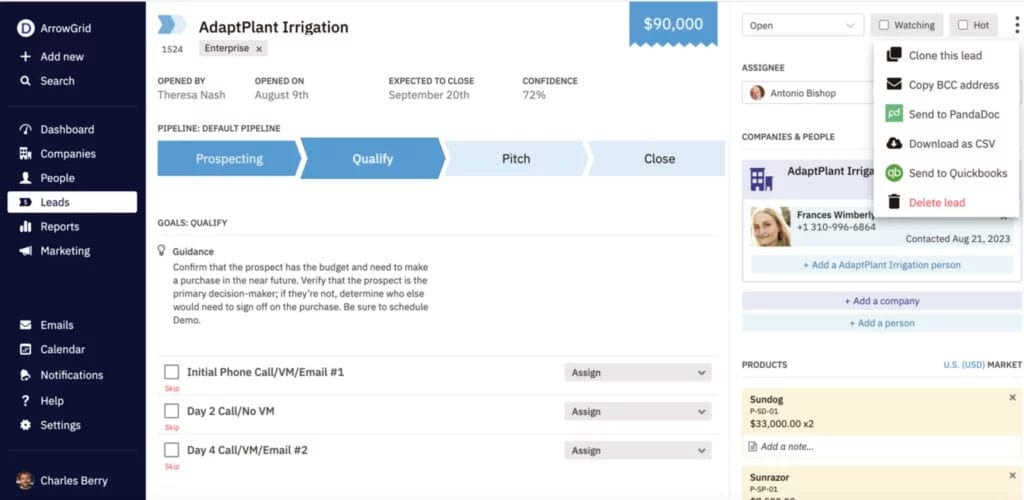
Automated workflows save time by handling routine tasks. They let you focus on more important work. Tasks like sending invoices or reminders can be done automatically. This cuts down errors and speeds up processes.
Improved customer communication helps build trust. CRM tools keep track of all messages and calls. You can reply faster and with better info. Customers feel valued when you respond quickly and clearly.
Real-time analytics show how your business is doing right now. You get instant reports on sales, customer habits, and more. This helps you make smart choices fast. No more waiting days for updates.
Credit: satvasolutions.com
Credit: www.nutshell.com
Frequently Asked Questions
What Is The Best Crm Software For Quickbooks Integration?
The best CRM software for QuickBooks integrates smoothly, automates workflows, and enhances customer management. Popular options include Salesforce, HubSpot, and Zoho CRM, all offering seamless QuickBooks syncing for better financial tracking and sales reporting.
How Does Crm Improve Quickbooks Functionality?
CRM software boosts QuickBooks by syncing customer data, automating invoicing, and tracking sales pipelines. This integration reduces manual entry, improves accuracy, and streamlines accounting and customer relationship management processes for small to medium businesses.
Can Quickbooks Crm Help With Sales Tracking?
Yes, QuickBooks CRM tracks leads, customer interactions, and sales stages. It provides real-time insights, enabling businesses to optimize sales strategies and improve revenue forecasting through accurate and timely data synchronization.
Is Quickbooks Crm Suitable For Small Businesses?
QuickBooks CRM is ideal for small businesses needing integrated accounting and customer management. It simplifies operations, reduces errors, and offers affordable pricing plans with scalable features to support growth and efficiency.
Conclusion
Choosing the best CRM software for QuickBooks helps your business run smoothly. It keeps customer info organized and tracks sales easily. Good CRM tools save time and reduce errors. They work well with QuickBooks to manage finances and customers together.
Pick a CRM that fits your business needs and budget. Start small and grow as you learn. Use these tools to improve how you work every day. Success comes from using the right software in the right way.
