

Are you tired of complicated payroll systems that waste your time and cause headaches? Imagine a tool that makes paying your team simple, fast, and accurate.
That’s exactly what Gusto Payroll offers. You’ll get a clear, hands-on look at the Gusto Payroll demo. You’ll discover how it can save you hours, reduce errors, and keep your employees happy. Ready to see if Gusto Payroll is the right fit for your business?
Keep reading to find out everything you need to know.
Gusto Payroll Features
Gusto Payroll offers a set of features designed to simplify how businesses handle employee payments. These tools help save time and reduce errors. Easy to use, they make payroll tasks less stressful.
Automated Payroll Processing
Gusto automates payroll calculations for every pay period. It calculates wages, taxes, and deductions quickly. This reduces mistakes and helps keep payroll accurate. The system runs on a set schedule so payments are always on time.
Employee Self-service
Employees can access their pay information anytime. They view pay stubs, tax forms, and benefits easily. This feature lowers questions to HR and speeds up communication. Staff control their details without waiting for help.
Tax Filing And Compliance
Gusto handles tax filings automatically for federal, state, and local taxes. It calculates and submits payroll taxes on your behalf. This keeps businesses compliant with tax laws and deadlines. The system also updates for new tax rules.
Direct Deposit And Payment Options
Gusto supports direct deposit to employees’ bank accounts. It offers fast, secure payment delivery every pay period. The platform also provides paper checks if needed. Multiple payment choices fit different business needs.
Setting Up Gusto Payroll
Setting up Gusto Payroll is a simple process that helps you manage your team’s pay. The platform guides you step-by-step. Each part is easy to follow and quick to complete.
Start with the basics and move to more detailed settings. This ensures your payroll runs smoothly and correctly.
Creating Your Account
Visit the Gusto website to start. Enter your email and create a secure password. Confirm your details to make your account active. This step lets you access all payroll features. The interface is user-friendly for all skill levels.
Adding Employees
Input your employees’ names and contact information. Add their tax details to ensure correct deductions. You can enter pay rates and work hours. This setup allows precise and timely payments. Review all entries to avoid errors.
Customizing Payroll Settings
Adjust pay schedules to match your business needs. Set up benefits and tax options for your team. Choose direct deposit or check payments. Customize these settings to fit your payroll cycle. Save changes to apply them immediately.
Navigating The Demo Interface
Navigating the Gusto Payroll demo interface is simple and clear. It shows you how the software works. This helps you see if it fits your business needs. The demo guides you through key tasks. You can explore without worry or risk.
The interface has easy menus and buttons. Each section focuses on important payroll tasks. You can try running payroll and checking reports. The layout is designed for quick learning.
Dashboard Overview
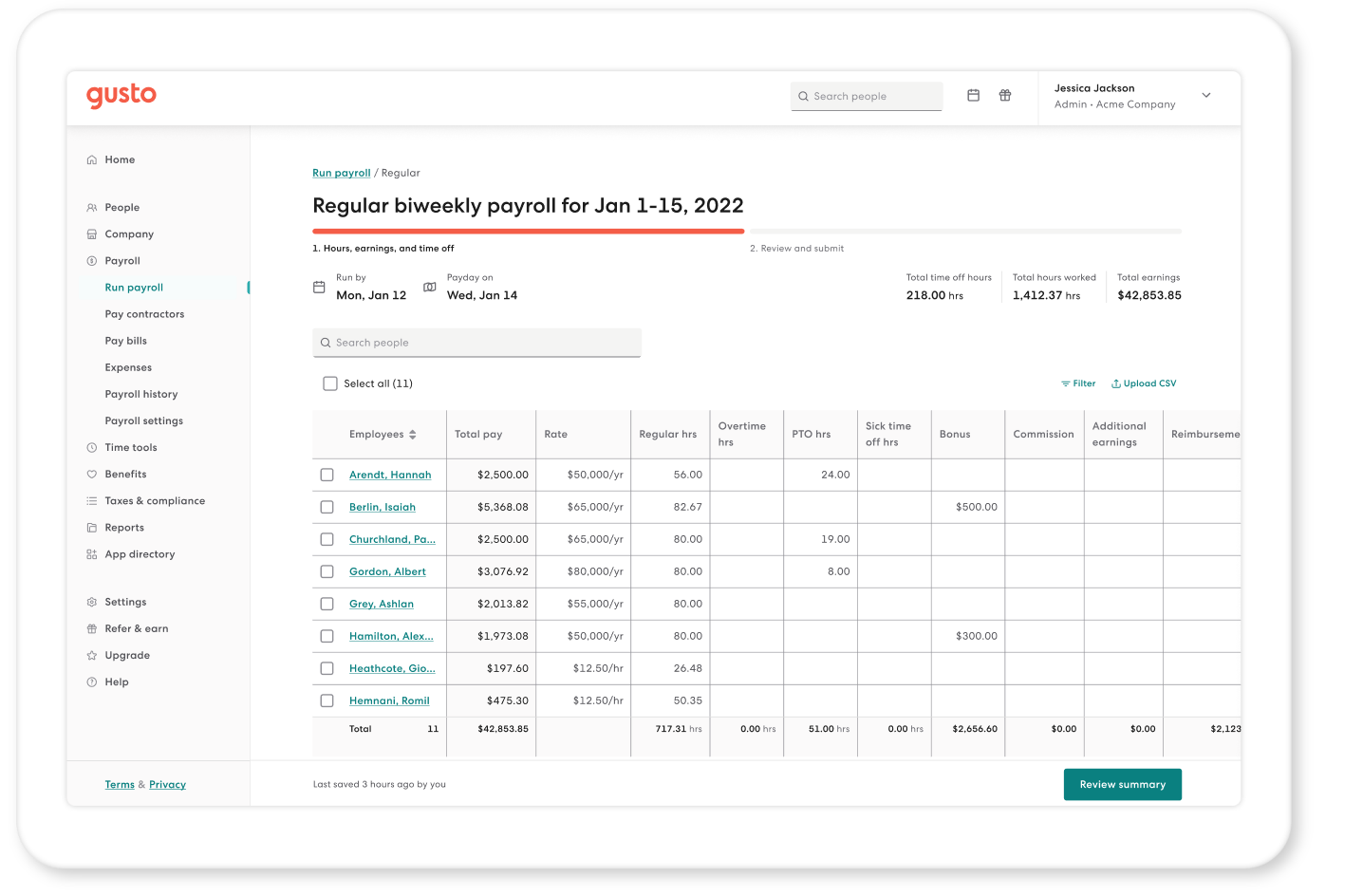
The dashboard is your main screen in the demo. It shows important information at a glance. You see employee details, payroll status, and alerts. The layout is clean and easy to read. This helps you find what you need fast.
Menus are on the left side of the screen. They let you switch between tasks quickly. The dashboard updates in real time. This keeps you aware of payroll progress.
Running A Payroll
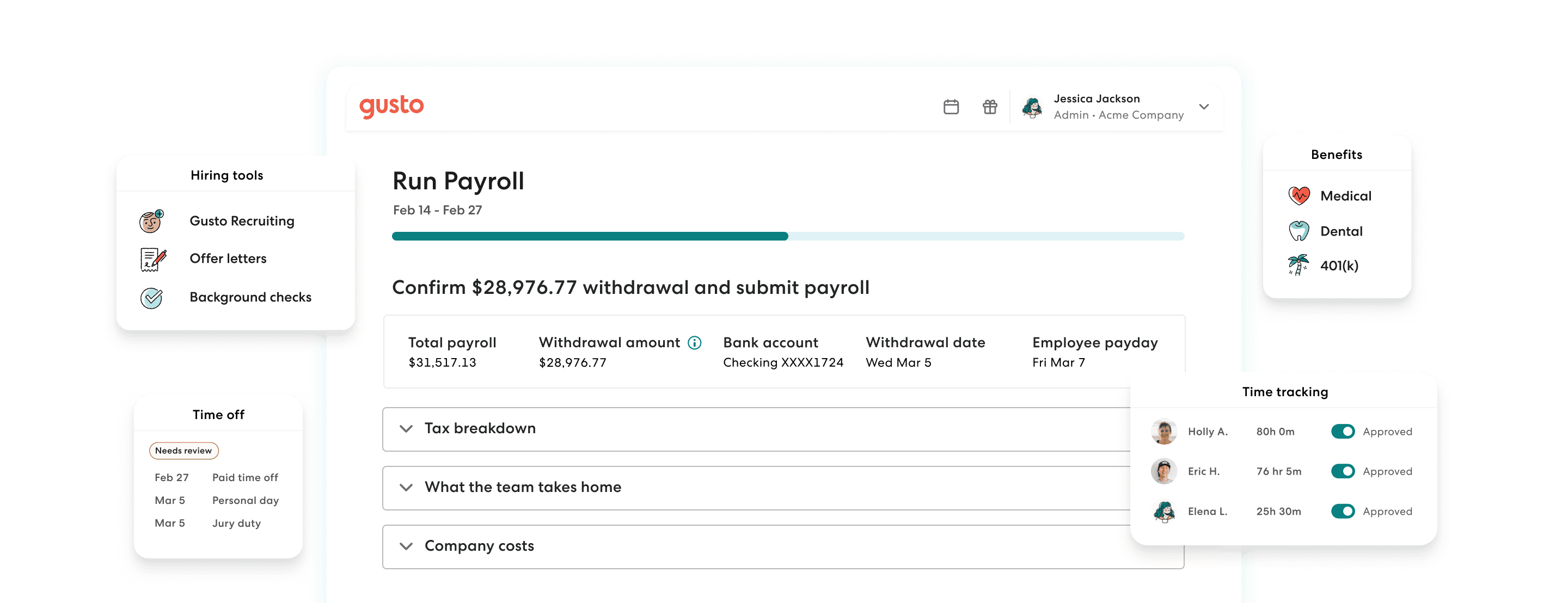
Running payroll in the demo is straightforward. You start by selecting employees to pay. Then you enter hours worked or salary details. The system calculates taxes and deductions automatically.
You can review all numbers before finalizing payroll. The demo lets you fix any mistakes easily. Once ready, you submit payroll for processing. It shows a confirmation to assure you.
Reviewing Reports
The demo offers several report types. You can see payroll summaries, tax filings, and payment histories. Reports are clear and easy to understand. You can download or print reports for your records.
Reviewing reports helps you track payroll accuracy. It also prepares you for tax deadlines. The interface guides you step-by-step through report options.
Credit: gusto.com
Benefits Of Using Gusto Payroll
Gusto Payroll offers many benefits that help small businesses run smoothly. It simplifies payroll tasks and reduces the time spent on calculations and paperwork. Using Gusto Payroll means fewer mistakes and better compliance with tax laws. It also keeps employees happy by making payments clear and timely.
Time Savings
Gusto Payroll automates many payroll tasks. It calculates wages and taxes quickly. This saves hours of manual work every pay period. Business owners can focus on other important tasks instead of payroll. The software also schedules payments automatically. No need to remember payment dates.
Error Reduction
Manual payroll often leads to mistakes. Gusto Payroll reduces errors by automating calculations. It checks for common payroll mistakes before processing payments. This lowers the chance of wrong paychecks or tax filings. Correct payroll means fewer problems with employees and the government.
Enhanced Compliance
Payroll laws change often. Gusto Payroll stays updated with tax rules and regulations. It automatically files payroll taxes on time. This helps businesses avoid penalties and fines. The system also creates reports needed for audits. Compliance is simpler and less stressful.
Employee Satisfaction
Employees like clear, timely payments. Gusto Payroll provides easy access to pay stubs and tax forms. Workers can view their payment history anytime. This builds trust and satisfaction among staff. Happy employees are more motivated and productive.
Integrations And Compatibility
Gusto Payroll Demo offers strong integration and compatibility features. These make it easy to connect with other important business tools. Smooth data flow saves time and reduces errors. This section highlights key integrations that enhance payroll management.
Accounting Software Integration
Gusto Payroll connects well with popular accounting software. It links directly to QuickBooks, Xero, and FreshBooks. This connection helps keep financial records accurate. Payroll data syncs automatically, avoiding manual entry mistakes. Users can track expenses and payroll costs easily. The integration supports better financial reporting and tax filing.
Hr Tools Compatibility
Gusto Payroll works with many HR tools. It integrates with time tracking and employee scheduling apps. This feature helps manage work hours and attendance accurately. The compatibility extends to benefits administration platforms as well. Employers can manage employee benefits within one system. These integrations improve overall HR workflow and efficiency.
Credit: gusto.com
Pricing And Plans
Understanding the pricing and plans of Gusto Payroll is important before choosing a service. It helps you pick the best option for your business size and needs. Gusto offers several packages that suit different types of companies. Each package has its own features and price points.
Available Packages
Gusto provides three main packages: Core, Complete, and Concierge. The Core package covers basic payroll and employee benefits. The Complete plan adds tools for managing time off and employee onboarding. Concierge includes all features plus HR support and compliance assistance. Prices start with a base fee plus a cost per employee each month.
Cost Vs. Value Analysis
Basic plans cost less but offer fewer features. More expensive plans add benefits that save time and reduce errors. For small businesses, the Core package is budget-friendly and covers essentials. Larger companies may find more value in Complete or Concierge plans. These include extra HR tools and personalized support that help manage staff better.
Tips For Maximizing Payroll Efficiency
Maximizing payroll efficiency can save time and reduce errors. Small improvements lead to smoother payroll processing. Using Gusto Payroll Demo effectively helps find these improvements. Here are practical tips to get the most from your payroll system.
Regular Updates And Reviews
Check payroll settings often to keep data accurate. Update employee information and tax rates regularly. Review past payroll reports to catch mistakes early. Consistent reviews prevent costly errors and keep payroll running smoothly.
Utilizing Automation Features
Use automation to handle repetitive payroll tasks. Automate tax calculations, direct deposits, and pay slips. Automation reduces manual work and lowers the chance of mistakes. Let the system do the routine tasks, so you focus on other duties.
Training Your Team
Train your staff on how to use Gusto efficiently. Teach them how to enter data correctly and handle common issues. Well-trained teams process payroll faster and with fewer errors. Regular training updates keep everyone up to date with new features.
Credit: www.youtube.com
Frequently Asked Questions
What Features Does The Gusto Payroll Demo Showcase?
The Gusto Payroll demo highlights automated payroll processing, tax filing, employee benefits management, and compliance tools. It helps users understand how Gusto simplifies payroll tasks efficiently.
How Can I Access The Gusto Payroll Demo?
You can access the Gusto Payroll demo by visiting Gusto’s official website. They offer an interactive walkthrough without requiring immediate sign-up, helping you explore key features.
Is The Gusto Payroll Demo Free To Try?
Yes, the Gusto Payroll demo is free to try. It allows prospective users to experience core payroll functionalities before committing to a paid plan.
How Does The Demo Help Small Businesses?
The demo helps small businesses by showing how to automate payroll and tax tasks. It saves time and reduces errors, making payroll management easier.
Conclusion
Trying the Gusto Payroll demo helps you see how it works. You can check if it fits your business needs. The demo shows easy steps to run payroll smoothly. It also highlights key features and benefits clearly. Testing before buying saves time and avoids problems later.
Give the demo a try to feel confident in your choice. This simple step makes payroll management less stressful. Experience the tool yourself and decide with ease.
