

Choosing the right accounting software can make a huge difference for your business. When it comes to Sage vs Xero, you might wonder which one fits your needs best.
Both offer powerful tools, but understanding their strengths and weaknesses can save you time and money. You’ll discover clear, simple insights to help you decide which software will boost your business growth and make managing your finances easier. Keep reading to find out which option is the perfect match for you.

Credit: www.chargebee.com
Sage And Xero Overview
Sage and Xero are two popular accounting software options. Both help businesses manage their finances and keep records. Each offers unique features suited to different needs. Understanding their backgrounds and target users can guide the right choice.
Company Backgrounds
Sage started in 1981 in the United Kingdom. It grew to serve millions of small and medium businesses worldwide. Sage focuses on providing reliable accounting and payroll solutions. Its experience spans several decades in the financial software industry.
Xero was founded in 2006 in New Zealand. It quickly became known for cloud-based accounting software. Xero emphasizes easy-to-use tools and real-time data access. It aims to simplify accounting for small businesses and freelancers.
Target Users
Sage targets small to medium-sized businesses. It also suits companies with complex payroll needs. Many accountants use Sage for its detailed financial reports. The software fits businesses wanting strong, traditional accounting features.
Xero focuses on small businesses and startups. Freelancers and sole traders find it very helpful. Its simple interface appeals to users with little accounting experience. Xero works well for those who want mobile access and online collaboration.
Core Accounting Features
Both Sage and Xero offer core accounting features to manage business finances efficiently. These features help track money, create bills, and report financial health. Understanding these tools helps choose the right software.
Invoicing And Billing
Sage and Xero allow users to create and send invoices quickly. Custom templates make invoices look professional. Users can set recurring invoices for regular clients. Both platforms support multiple currencies. Payment reminders reduce late payments. Tracking invoice status is simple and clear.
Expense Tracking
Both tools let users record expenses easily. Uploading receipts is fast and organized. Expenses can be categorized by type or project. Sage and Xero help monitor spending closely. This keeps budgets on track. Users can attach notes to each expense for clarity.
Bank Reconciliation
Bank reconciliation matches transactions in software with bank statements. Sage and Xero automate this process. They import bank data daily. Users review and approve matches quickly. This reduces errors and saves time. Clear reconciliation reports help maintain accurate records.
Financial Reporting
Both platforms generate detailed financial reports. Profit and loss statements show business earnings and costs. Balance sheets display assets and liabilities clearly. Reports can be customized by date or category. These reports help understand financial health. Sharing reports with accountants is easy and secure.
User Experience
User experience plays a key role in choosing accounting software. It affects how easily users can manage finances and complete tasks. Both Sage and Xero offer unique experiences. Understanding their interface, ease of use, and mobile features helps pick the right tool.
Interface Design
Sage has a clean and organized layout. Menus and features are grouped clearly. This helps users find what they need fast. The color scheme is calm and professional. It reduces eye strain during long sessions.
Xero uses a simple and modern design. The dashboard shows important info at a glance. Icons and buttons are large and easy to spot. This design suits users who prefer minimal clutter.
Ease Of Use
Sage offers step-by-step guides for many tasks. It supports beginners with helpful tips. The learning curve is gentle but steady. Some features may take time to master.
Xero feels intuitive from the start. Most actions require only a few clicks. It suits small business owners without accounting skills. Quick setup saves time and reduces frustration.
Mobile App Functionality
Sage’s mobile app covers basic functions well. Users can send invoices and track expenses. It syncs smoothly with the desktop version. Some advanced features are missing on mobile.
Xero’s app offers full access to key features. Users can reconcile bank transactions and create reports. The interface adapts well to small screens. Notifications keep users updated on financial activity.

Credit: x3consulting.com
Pricing And Plans
Choosing the right accounting software depends a lot on cost and plan options. Sage and Xero offer different pricing and plans. This section breaks down their subscription costs, feature tiers, and trial or refund policies. Understanding these can help you pick the best fit for your budget and needs.
Subscription Costs
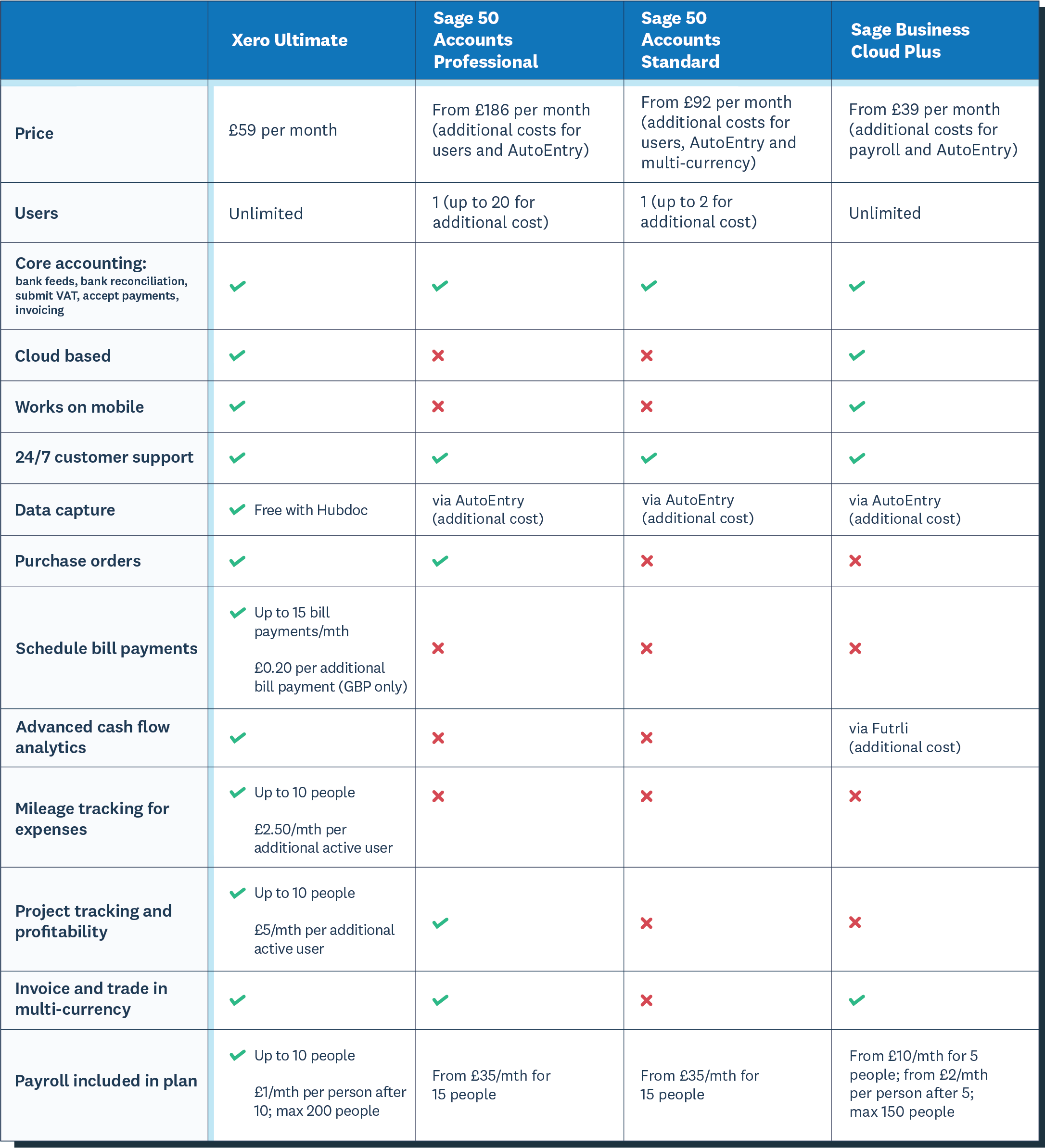
Sage pricing starts with a basic plan suitable for small businesses. Its monthly fees vary by region but usually begin around $10. Xero’s pricing starts higher, near $12 per month. Both platforms offer plans that increase in price with added features. Monthly subscription fees are billed automatically.
Feature Tiers
Sage has multiple tiers, each adding more tools. The basic plan includes invoicing and expense tracking. Higher tiers add payroll and inventory management. Xero also splits plans into tiers. Its starter plan covers basic accounting. Premium plans include advanced reporting and multi-currency support. Each tier builds on the last, offering more business support.
Trial And Refund Policies
Sage offers a free trial for new users, usually lasting 30 days. This lets you test features before paying. Xero provides a 30-day free trial too, with full access to all plans. Both platforms do not typically offer refunds after the trial. Cancel before the trial ends to avoid charges. Trials help decide if the software fits your needs.
Integrations And Add-ons
Integrations and add-ons enhance the power of accounting software. They connect your tools and simplify workflows. Sage and Xero offer various options to fit different business needs. These features help users save time and reduce manual work.
Third-party Integrations
Sage supports many third-party apps like payment gateways and CRM tools. It connects well with inventory and payroll software. These integrations help businesses automate tasks and keep data synced.
Xero also offers strong third-party integrations. It works smoothly with apps for invoicing, time tracking, and e-commerce. Users can choose from hundreds of apps to extend its functions.
Marketplace Availability
Sage has a dedicated marketplace called Sage Marketplace. It lists various add-ons verified for compatibility. Businesses can find apps that match their industry and needs.
Xero’s app marketplace is large and easy to browse. Apps are grouped by categories like finance, sales, and productivity. This helps users quickly find useful tools for their business.
Customer Support
Customer support plays a big role in choosing the right accounting software. Both Sage and Xero offer various support options to help users solve problems quickly. Good support can save time and reduce stress for small business owners.
Support Channels
Sage provides support through phone, email, and live chat. Users can also access a help center with articles and guides. Xero offers phone support, email help, and live chat as well. Both platforms have mobile apps that include support features.
Response Times
Sage usually responds within a few hours during business days. Xero aims to answer support requests within 24 hours. Live chat tends to provide faster replies on both platforms. Response speed can vary based on the issue and time of day.
Community Resources
Sage hosts forums where users discuss common issues and share tips. Xero has a large user community and active forums too. Both companies offer webinars and tutorials to help users learn more. These resources help users find answers without waiting for support.
Security And Compliance
Security and compliance are critical for any accounting software. Businesses trust these platforms with sensitive financial data. They need assurance that their information is safe and meets legal standards. Sage and Xero both prioritize security and compliance to protect users.
Data Protection Measures
Sage uses encryption to keep data secure during transfer and storage. It also employs multi-factor authentication to prevent unauthorized access. Regular backups ensure data is not lost. Xero applies strong encryption protocols and continuous monitoring of its systems. It offers role-based access to control who sees what. Both platforms update their security features often to address new threats.
Regulatory Compliance
Sage complies with global standards like GDPR and SOC 2. It ensures data handling meets legal requirements in various countries. Xero also follows GDPR and is certified for ISO 27001. This certification shows strong information security management. Both systems help businesses stay compliant with financial regulations. They provide audit trails and secure record keeping to support legal audits.
Pros And Cons
Choosing between Sage and Xero requires understanding their pros and cons. Each software has unique benefits and some drawbacks. This helps businesses decide which fits their needs better.
Sage Strengths And Weaknesses
Sage offers strong accounting features for small to medium businesses. It supports payroll, invoicing, and tax management efficiently. The software provides detailed reports that aid decision-making. It also integrates with many business apps.
On the downside, Sage can be complex for new users. The interface is less intuitive compared to competitors. Customer support sometimes lacks quick responses. Pricing is higher for advanced features, which may not suit all budgets.
Xero Strengths And Weaknesses
Xero has a user-friendly interface that simplifies accounting tasks. It offers real-time bank feeds and automatic transaction matching. The software supports unlimited users at no extra cost. It also provides strong mobile app functionality.
Some users find Xero’s reporting options limited. It may lack deep customization for complex businesses. Customer service can be slow during peak times. Payroll is only available in certain regions, reducing its reach.
Choosing The Right Software
Choosing the right accounting software is important for your business success. Both Sage and Xero offer strong features, but your choice depends on your specific needs. Understanding key factors helps you pick the best fit for your company.
Business Size And Needs
Small businesses often need simple tools for invoicing and tracking expenses. Sage works well for small to medium businesses with basic accounting needs. Xero suits businesses that want cloud access and easy collaboration with accountants. Larger companies may require more advanced features like inventory or payroll. Consider what your business currently needs and what it may need soon.
Budget Considerations
Cost plays a big role in choosing software. Sage usually has a one-time fee or subscription with different plans. Xero works on a monthly subscription model with tiered pricing. Think about your budget now and how much you can spend regularly. Also, check for extra costs like add-ons or support fees. Pick software that fits your financial plan without cutting important features.
Scalability
As your business grows, your software must grow too. Sage offers scalable solutions for growing companies with more users and features. Xero is designed to scale easily with cloud-based tools and integrations. Choose software that adapts to your growth and changes in business needs. Avoid switching software often; it can waste time and money.
Credit: www.xero.com
Frequently Asked Questions
What Are The Main Differences Between Sage And Xero?
Sage offers robust accounting features for medium to large businesses. Xero is cloud-based, user-friendly, and ideal for small to mid-sized businesses. Sage focuses on comprehensive financial management, while Xero excels in collaboration and real-time data access.
Which Software Is Better For Small Businesses, Sage Or Xero?
Xero is generally better for small businesses due to its ease of use and affordable pricing. Sage suits businesses needing advanced accounting tools and scalability. Your choice depends on your business size and accounting needs.
Can Sage And Xero Integrate With Other Business Tools?
Yes, both Sage and Xero support integrations with various third-party apps. Xero has a larger marketplace with over 800 apps. Sage also offers strong integrations, especially with industry-specific software.
How Do Sage And Xero Handle Invoicing And Payments?
Xero provides simple, customizable invoicing and supports multiple payment gateways. Sage offers advanced invoicing with automated reminders and payment tracking. Both streamline billing but differ in user experience and automation features.
Conclusion
Choosing between Sage and Xero depends on your business needs. Both offer strong features for accounting and finance. Sage suits larger businesses with complex needs. Xero works well for small to medium companies. Consider ease of use, pricing, and support options carefully.
Test each option to see which fits your workflow best. Making the right choice saves time and money. Focus on what helps your business grow steadily. Keep your accounting simple and effective.
